Using a Roof Color and Material Simulation Tool for Installation
Learn how to translate outputs from a roof color and material simulation tool into precise material orders and flawless physical roof installations.
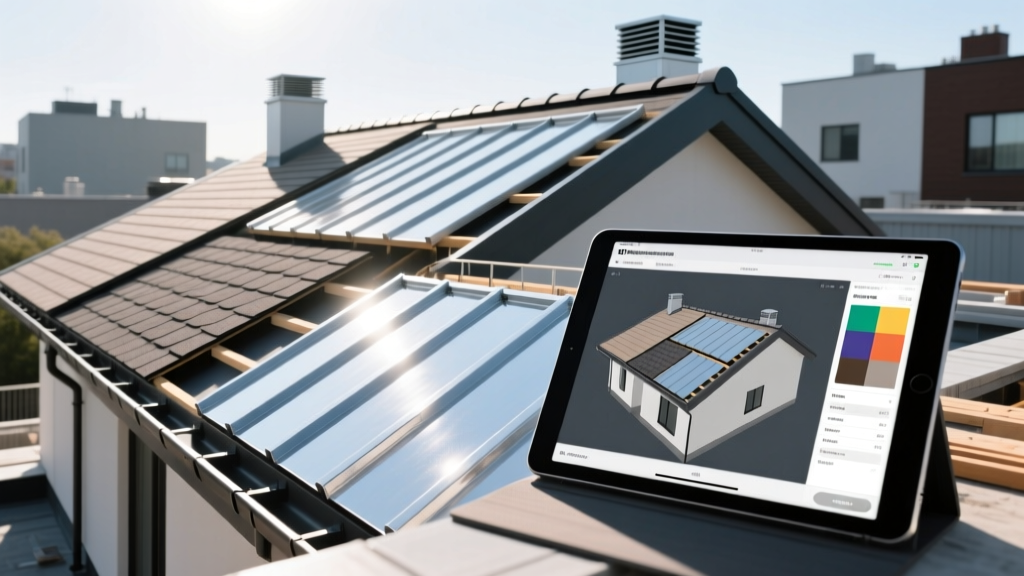
The Bridge Between Digital Design and Physical Installation
A roof color and material simulation tool is only as valuable as the physical installation it produces. In 2026, augmented reality (AR) and LiDAR-equipped tablets allow contractors to generate millimeter-accurate 3D models and photorealistic material overlays. However, a common failure mode in modern roofing projects is the 'expectation gap'—when the physical shingles, trim, and lighting conditions fail to match the digital rendering. This guide details the exact workflow for translating digital simulation outputs into precise material procurement, staging, and physical installation.
Step 1: Calibrating the Digital-to-Physical Color Pipeline
Screens emit light; roofs reflect it. If your simulation tool is not calibrated, the 'Charcoal' asphalt shingle selected on an iPad Pro will look vastly different when installed under direct midday sun. Before presenting a simulation to a client or ordering materials, enforce strict color management protocols.
- Hardware Calibration: Use a colorimeter (such as the X-Rite i1Display Pro) to calibrate your presentation tablet to the D65 standard illuminant, which represents average daylight.
- Lighting Context: Run the simulation under multiple environmental presets. A north-facing roof plane in a heavily wooded lot will render a 'Weathered Wood' shingle significantly darker than the same material on a south-facing, unobstructed plane.
- The Physical Sample Mandate: Never finalize an order based solely on a roof color and material simulation tool. Require the homeowner to approve a physical 2x2 foot sample board viewed outdoors at both 10:00 AM and 4:00 PM.
Simulation tools assume a perfectly uniform color field. In reality, asphalt shingles are manufactured in batches. A 40-square roof order may span three different dye lots. Failing to blend these bundles during installation will result in horizontal banding that completely ruins the simulated aesthetic.
Step 2: Translating Simulation SKUs to Physical Material Orders
Most roof color and material simulation tools use generic or marketing-specific color names that do not perfectly align with manufacturer SKU databases. Translating these accurately prevents costly return trips to the lumberyard. Below is a cross-reference matrix for popular architectural shingle lines based on standard simulation palettes.
| Simulation Palette Name | GAF Timberline HDZ | Owens Corning Duration | CertainTeed Landmark |
|---|---|---|---|
| Charcoal / Dark Gray | Charcoal | Onyx Black | Charcoal Black |
| Weathered Wood / Brown | Weathered Wood | Teak | Weathered Wood |
| Slate / Blue-Gray | Biscayne Blue | Pacific Wave | Colonial Slate |
| Desert / Warm Tan | Shakewood | Desert Tan | Resawn Shake |
Calculating Waste Factors from Simulated Geometry
While LiDAR scans in apps like Hover or EagleView provide exact square footage, they do not automatically account for physical cutting waste. Use the simulation's complexity metrics to adjust your order:
- Simple Gable (Simulated Valleys: 0): Add 10% waste factor.
- Standard Hip/Valley (Simulated Valleys: 2-4): Add 15% waste factor.
- Complex Mansard/Dormers (Simulated Valleys: 5+): Add 20% waste factor, and order an additional 5% for ridge cap material due to increased linear footage.
Step 3: Staging and Layout Based on the Digital Model
The 3D elevation views generated by your roof color and material simulation tool should dictate your physical staging plan. Hoisting materials to the roof deck is a major bottleneck; use the digital model to place bundles precisely where they will be consumed.
- Identify Primary Roof Planes: Use the simulation's square-footage breakdown per plane to distribute bundle weight evenly across the trusses. Never stage more than 300 lbs per square foot of deck area to prevent structural deflection.
- Accent Placement: If the simulation features a color break (e.g., a darker shingle on a front-facing dormer), stage those specific accent bundles directly adjacent to that dormer to avoid cross-contamination with the primary field color.
To achieve the uniform appearance promised by the simulation tool, follow the Asphalt Roofing Manufacturers Association (ARMA) guidelines: always work from at least three open bundles simultaneously. Stagger the bundles as you progress across the roof plane to naturally blend minor granule and dye-lot variations.

Integrating LiDAR Data for Decking Preparation
Modern roof color and material simulation tools do more than render shingles; they map the physical topography of the roof deck using LiDAR. Before the first shingle is nailed, use this spatial data to plan your decking preparation.
- Identifying Sag and Deflection: High-resolution LiDAR scans (accurate to within 10mm) will highlight dips in the roof deck that are invisible from the ground. Flag these areas in your simulation software and order additional OSB or plywood sheets specifically for sistering joists or shimming the deck before underlayment installation.
- Ventilation Mapping: Use the simulated ridge length and intake soffit measurements to calculate exact net free ventilation area (NFVA). If the simulation shows 120 linear feet of ridge, you will need exactly 120 feet of continuous ridge vent, plus corresponding soffit venting to maintain the 1:300 or 1:150 ventilation ratio required by modern building codes.
Step 4: Trim, Accents, and Energy Code Compliance
A roof system is more than just the field shingles. The simulation tool likely includes fascia, gutters, and ridge vents. Matching these physical components to the digital design requires precise specification.
Matching Trim and Metals
If your simulation utilizes a specific metallic accent (like copper flashing or dark bronze drip edge), standard galvanized steel painted on-site will fail to match the digital rendering and will degrade quickly. Order pre-finished aluminum coil stock from manufacturers that match the exact RAL or Kynar 500 color codes exported from your design software.
Navigating Cool Roof Codes with Dark Simulations
Homeowners frequently select dark charcoal or black shingles in simulation tools for their high-contrast curb appeal. However, in jurisdictions with strict energy codes, dark roofs may violate Solar Reflectance Index (SRI) requirements verified by the Cool Roof Rating Council (CRRC). According to the U.S. Department of Energy, cool roofs require an initial SRI of 20 or higher for steep-slope applications. If your simulation features a dark color that fails local SRI codes, you must pivot the design to a 'cool color' series—shingles embedded with highly reflective granules that mimic dark tones while reflecting infrared radiation.
Troubleshooting Post-Installation Discrepancies
Even with perfect planning, the installed roof may look different than the simulation. Here is how to diagnose and resolve the most common physical-to-digital mismatches:
| Symptom | Root Cause | Physical Resolution |
|---|---|---|
| Roof looks significantly lighter than simulation | High UV reflection from new granules; simulation assumed weathered state. | Educate client that granules will shed slightly and darken over 6-12 months. No physical fix required. |
| Visible horizontal banding or streaking | Failure to blend dye lots; installer worked from single bundles. | Requires manual blending. If severe, selective tear-off and re-installation using the 3-bundle method is necessary. |
| Trim color clashes with shingle edge | Screen gamut limitations; Kynar paint batch mismatch. | Order physical trim samples before finalizing metal orders. Use custom coil coating if standard RAL colors fail. |
Frequently Asked Questions
Can I use a simulation tool to order metal roofing panels?
Yes, but with stricter tolerances. While asphalt shingles allow for a 10-15% waste factor, standing seam metal panels simulated in tools like EagleView must be ordered to exact inch-by-inch measurements. Always verify the simulation's panel lengths against a physical laser measurement on-site before submitting the factory order, as custom-cut metal panels are non-returnable.
How do I handle HOA approvals using simulation outputs?
Most Homeowner Associations in 2026 accept high-resolution PDF exports from verified roof color and material simulation tools. Export the 'Elevation View' and 'Material Specification Sheet' directly from the software. Ensure the exported document includes the manufacturer's exact color name and SKU, as HOA architectural committees will cross-reference this against their approved material matrix.
Mastering the transition from a roof color and material simulation tool to the physical tear-off and installation requires rigorous attention to SKU translation, material staging, and environmental variables. By treating the digital model as a precise blueprint rather than a mere visual aid, contractors can eliminate expectation gaps, reduce material waste, and deliver installations that perfectly mirror the approved design.
Written by
Priya KapoorPriya Kapoor is a real estate market analyst and construction economics researcher with expertise in housing affordability, development feasibility, and infrastructure investment. She holds a Master of Regional Planning from Cornell University and previously worked as a senior analyst at CBRE's Investment Properties group, where she modeled returns for $4B in mixed-use development pipelines. Priya now runs an independent research practice advising developers, municipalities, and REITs on construction cost forecasting and market timing. She publishes the quarterly "BuildMat Market Pulse" report tracking material price indices across 12 commodity categories. Based in Austin, TX, Priya serves on the board of Habitat for Humanity Austin and is a marathon runner.
More from Priya Kapoor
View all
Construction Cost
Cost to Build a 1600 Sq Ft Home in 2026: Full Breakdown
Accurate 2026 cost to build a 1600 sq ft home—material, labor, and regional pricing breakdowns included. Plan your budget with real-time estimates.
Aug 11, 2026
Wood & Lumber
Name the Types of Wood for Pressure Treatment and Preservation
Learn how to name the types of wood best suited for pressure treatment. Compare species treatability, chemical retention levels, and 2026 preservation costs.
Aug 4, 2026
Stone & Masonry
Stone Veneer Suppliers Lindenhurst: 2026 Cost Analysis
Analyze 2026 stone veneer costs in Lindenhurst, NY. Compare local supplier pricing, delivery fees, and Suffolk County installation labor rates.
Aug 4, 2026